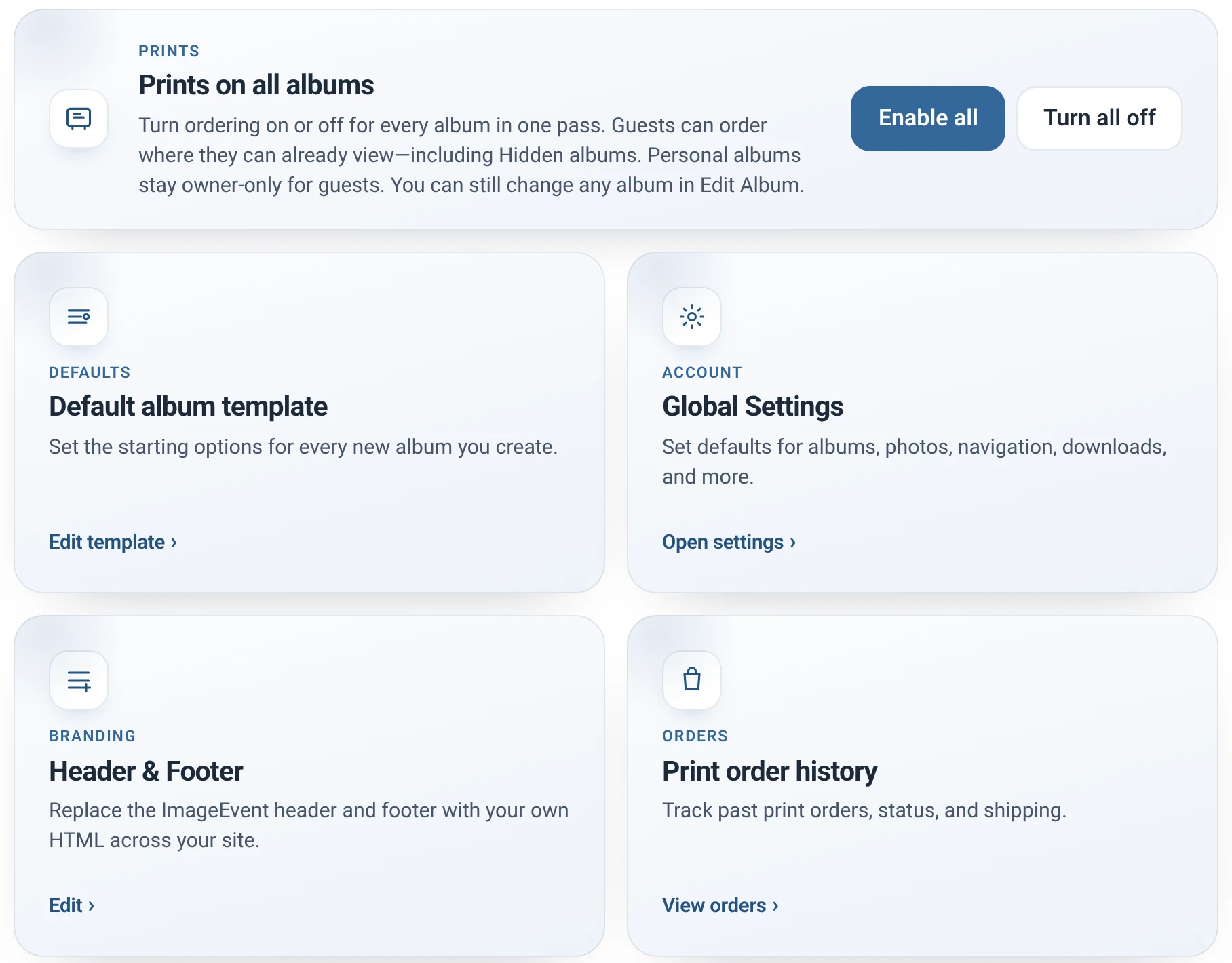
Screenshot
A new Tools page
The account-wide jobs in one place: turn on prints for every album, set defaults, manage your address book, and download your files.
See all features
Guest uploads, private links, a full archive, prints, polish, and HDR video.
New Guest Uploads
Everyone’s photos in one album, without chasing anyone. Share one link or QR code, and guests, clients, and teammates add from any phone, tablet, or computer.
Illustration. Instead of photos scattered across everyone’s devices: one album you control.
Guests open your link in a browser on any phone, tablet, or computer, pick photos and videos, and upload. You can ask for their name, so you know who shared what.
You choose — nothing is preselected the first time, so you pick deliberately. Uploads can wait for your OK, or go straight into the album. Waiting uploads show on your album bar, home page, and folder pages. We email you, then remind you daily until you have reviewed them.
Guest photos show who they are from, right under the picture, in the same album as your own photos.
Guest Uploads works with the Enhanced layout. Choose it under Default layout in Global Settings.
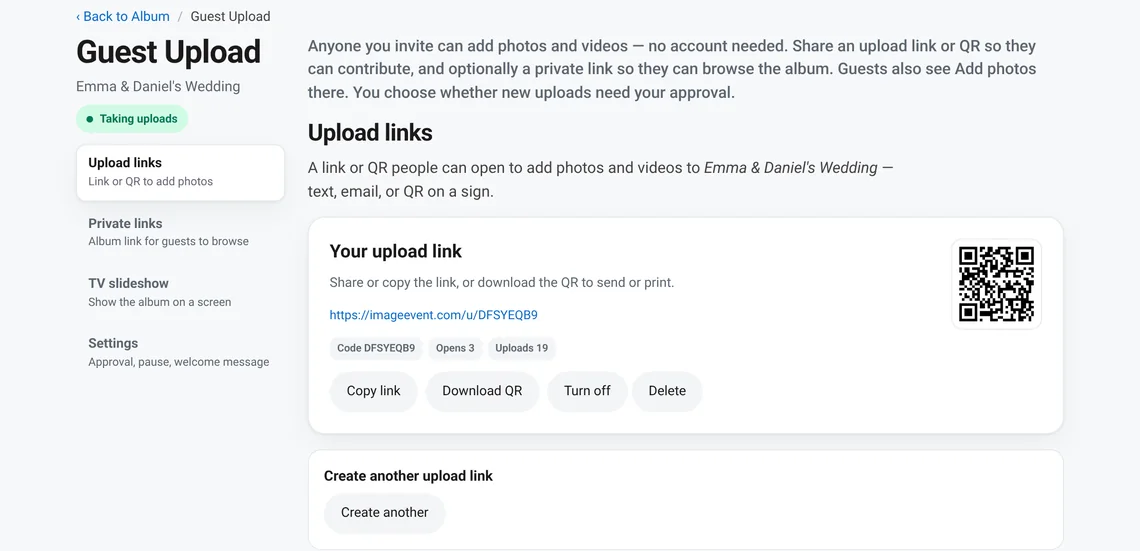
1
Click Guest Upload on your album. You get a link and a QR code. Print the QR code on a sign, a card, or an invitation.


2
They scan the QR code or open the link, enter a name, and choose photos and videos. Your welcome message is the first thing they see.
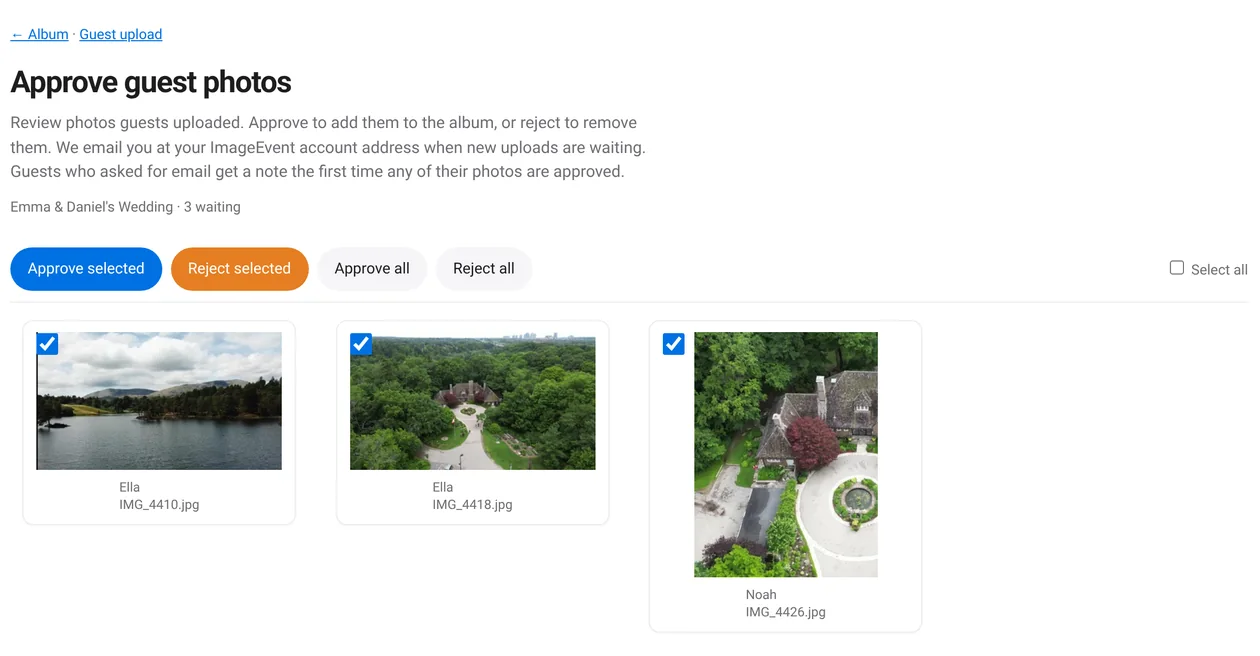
3
Review what came in. Approve or reject selected photos, or all at once. Approved photos join the album. Guests who asked for email get a note the first time their photos are added.
Party mode
Create a TV link and open it on a TV or a spare laptop. It plays the album full screen, photos and videos, with a QR code in the corner so everyone in the room can add theirs.
The TV checks for new photos every 10 seconds, so guest uploads show up while the party is still going.

New Private Links
A Private Link is an unlisted web address that is very hard to guess. Send it to the people you want, add a password if you like, and turn it off when you are done. Photos and videos for these links are served from a private host that is not indexed.


Left: your links, with a label only you see. Right: what a visitor sees first, if you set a password.
Create a separate link for each group, like “Smith family” or “Bridal party”. The label is for you. Each link can have its own password. Invite Friends and Email Album can send a Private Link too, or create a new one right there. Each link shows how many times it was opened and how many downloads it had.
Use a link for as long as you want, then switch it off. Or give it an end date when you create or edit it.
They open the link, enter the password if there is one, and see your album. When downloads are on for the album, they can Download all.

What visitors see
Your title, your photos, your slideshow, and Download all when you allow downloads.
Folders too
Put a Private Link on a folder, for example a client’s folder. Visitors see the albums inside and open the ones they want.

New Full Archive
One download brings every Original in your account home, sorted into your folders and albums.

The Download your files page, ready to go.

Simple to start
The page gives you the steps for Windows and for Mac, right next to your download.
Your folders, your names
Your folders and albums become folders on your computer, named after their web addresses. Your photos keep their file names.
Close the window to pause. Double-click Start again and it continues. Files you already have are skipped.
You need free space for all of your Originals. A very large account can take several days to download.
See Plans to find the right one for you.
Back Prints and Products
Fine prints, framed pieces, canvas, metal, and more from three professional labs. Order right from your albums.
Illustration. Frames, canvas, metal, and acrylic are some of what you can order.
Open an album and choose Order prints, then check out. Tax and shipping are added at checkout.
ImageEvent sells the print, and you choose who makes it. Mix labs if you like.
Photo prints, fine art, canvas, metal, framed prints, framed canvas, acrylic, cards, posters, and mugs.
US partner network
Best everyday value on photo prints.
Anaheim, California
Strongest choice for canvas, fine art, and metal.
US print-on-demand network
Broad catalog with competitive photo and wall art.
1
Enable Prints on all albums in Tools, or per album in Edit Album.
2
Click Order prints on an album, with or without checking photos first. Your list is saved so you can come back anytime.
3
Review your items in the Print cart, choose Economy, Standard, or Express shipping, and check out. Past orders are in Print order history.
New Product polish
A new Tools page, an Auto viewer that fits every screen, and refreshed Email Album and invitation pages.
Screenshot
The account-wide jobs in one place: turn on prints for every album, set defaults, manage your address book, and download your files.
See all featuresIllustration
Photos open the right way on every screen: a pop-up on computers, one photo per page on phones and tablets. Choose it under How albums open in Global Settings.
Global SettingsIllustration
Clear steps for who, subject, and message, a preview of exactly what recipients get, and a link to your album or a Private Link you can turn off later. Photos load from the site; nothing is attached.
Illustration
Invite Friends sends your album to people from your address book or typed addresses, using your album URL or a Private Link you can turn off later. Recipients go as BCC, so their addresses stay private.
New Video
Upload 4K and 8K Ultra HD HDR video into the same albums as your photos. There is no limit on how long a video can be.
Illustration. A video can be any length.
HDR10 and Dolby Vision uploads are streamed as HDR10. Screens without HDR get an SDR version, made automatically.
Video length is not limited by time. Full events and long recordings are welcome. Only the per-file size limit applies.
Videos live in the same albums. If your file has caption tracks, guests can pick one in the player.
Every size
We prepare web versions in the background, typically in seconds: 720p and 1080p, plus 4K on Premium and 8K on Power Premium when your source supports it. When downloads are allowed, copy a link or download any size.
Per-file limit for video: 300MB on Premium, 4GB on Power Premium.