|
|
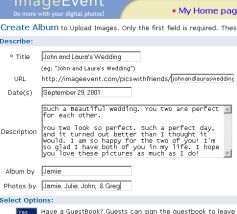
1. Describe Album
2. Select Options
3. Select album privacy level & add guest password
Select the sizes to zoom images in and out in. Every image uploaded, generates 5 more images. Images are generated from thumbnail to x-Large preserving original size.Select to have your thumbnails Small 1x, Medium 1.5x, Large 2x or x-Large 2.5x.
|
| | Enter title, URL, date(s), description, album by (who made the album), and photos by (who took the photos) to describe your album. Use regular text or add your own html.
Protected Album Privacy. You control who accesses your albums. Keep your albums personal, hidden, share them with your friends, or share them in the ImageEvent public gallery. Add guest password.Select number of items per page, number of columns, ability to order prints, default size to open images in, add guestbook, right-click disable & more! |  |
|

